 Open UI
 Declarative Overscroll Actions (Explainer)
Introduction
The web platform allows for sophisticated scrolling experiences, but it currently lacks a semantic way to utilize “overscroll” space (the area beyond the scroll boundary).
Common UI patterns like drawer-menus (swiping past the edge to reveal a menu) currently rely on complex nested scrollers or JavaScript gesture polyfills. These workarounds are difficult to implement, computationally expensive, and often fail to provide accessible alternatives for non-touch users.
Proposal
We propose a set of HTML attributes and CSS properties that declaratively bind an element (the “overscroll content”) to the scroll boundary of a container.
Crucially, this binding is defined both semantically on the participating
elements (overscroll container and overscroll area) as well as on an
activatable element (like a <button>). This ensures that the menu set up
is both semantically represented in DOM and that every gesture-based action has
a guaranteed accessible fallback interaction (click/Enter) on the activatable
element without extra developer effort.
Goals
- No JavaScript: Enable swipe-to-reveal gesture based menu interactions using only HTML and CSS.
- Accessibility by Default: Enforce the existence of a semantic button to toggle the view, ensuring keyboard and assistive technology support.
- Performance: Offload gesture physics and animation to browser’s control, ensuring possibility of composited gestures.
The API
There are several parts to the API:
First, the container needs to be identified as supporting overscroll areas. This
is done by specifying overscrollcontainer attribute on the container.
Second, the overscroll area (e.g. the side menu element), which must be a
direct child of an overscroll container, is identified as the overscroll area.
This is done by specificying overscrollarea attribute on the container.
Finally, we introduce a three new command values, to bind a
trigger button to the overscroll area using commandfor attribute:
show-overscroll- this invoker opens the referenced overscroll areahide-overscroll- this invoker closes the referenced overscroll areatoggle-overscroll- this invoker toggles the state of the overscroll area. If the area is open, then this will close it. Conversely, if the area is closed, then this will open it.
Note that either the show-overscroll invoker (a.k.a. show invoker) or the
toggle-overscroll invoker (a.k.a. toggle invoker) must be present in order
for this structure to be recognized as an overscroll structure. The
overscrollcontainer and overscrollarea attributes on their own are not
sufficient. Also note that the hide-overscroll invoker (a.k.a. hide
invoker) is neither sufficient nor required for this structure. The rationale
is that since the ::overscroll-backdrop already acts as a hide invoker, we
don’t require a developer specified one. The developer is, of course, free to
provide one as a way to express specific user experience.
See the discussion on inertness for justification for three different commands.
<div id="container" overscrollcontainer>
    <menubar id="menu" overscrollarea>
        <menuitem>Home</menuitem>
        <menuitem>Settings</menuitem>
    </menubar>
    Some content.
</div>

<button commandfor="menu" command="toggle-overscroll" id=btn>
  Toggle Menu
</button>
Behavior
- Positioning: the
#menuis effectively absolutely positioned within the “overscroll” area of the overscroll container. - Chaining: If a user scrolls
#containerto its limit, the scroll chains to the#menu, pulling it into view. Note that the#containerdoes not have to be a scroller for this effect. - Activation: As an alternative to scroll gestures, activating the
<button>will perform ascrollIntoView-like action on the#menu. Activating it again scrolls#menuback out of view.
(Here is a simple demo implementation on Github.io. This demo does not require any browser features.)
Terminology
In this explainer, we’ll use the following terminology:
- overscroll container: the scrolling container with the
overscrollcontainerattribute.#containerin the above code snippet. - overscroll area: the element within the overscroll container that gets
rendered as overscrolled content.
#menuin the above code snippet. - “overscroll invoker”: the command invoker with
one of the new
commandvalues pointing to the overscroll area.#btnin the above code snippet.
Nesting and Structure
- Overscroll invoker: There is no special requirements for the position of the overscroll invoker relative to the overscroll container or area. It can live anywhere in the tree scope, subject to the normal rules for command invoker relationships.
- Overscroll area: The overscroll area element must be a direct child
of the overscroll container. It can also have other content before or after it.
Note that the overscroll area element will typically be taken out of flow, as
if it is
position: absoluteand contained by the overscroll container.
Chaining and Ordering
An overscroll container can have multiple overscroll areas (e.g., one on each
side). The ::overscroll-area-parent manages these as siblings.
- LIFO Order: Chaining follows a “last-in, first-out” order. The last overscroll area in DOM order within the overscroll container is chained, and scrolls, first.
- Chaining Path: When the innermost scroller reaches its limit, it chains to the next overscroll area, and so on.
Configuring the style of overscroll area.
By default, overscroll area pushes the container’s content. This is controlled
by a new css property overscroll-container-type:
overscroll-container-type: auto | push | overlay | none
- auto: The default behavior, currently same as
pushbut this is subject to discussion. - push: The overscroll areas of this overscroll container will push other content out of the way.
- overlay: The overscroll areas of this overscroll container will overlay on top of other content.
- none: This precludes the overscroll container from acting as an overscroll container. Note that this is a CSS “opt-out” of the behavior, which is useful for use in media queries to toggle overscroll container feature without needing to modify the semantic delcarations in HTML.
Note that this is a property of the overscroll container, not overscroll area, for simplicity of API design. It therefore affects all overscroll areas within that container. If use cases arise that require different overflowing elements to have different overlay modes, we can revisit this. But that does not seem to be a common use case today on the web.
Events
To allow developers to hook into the lifecycle of the gesture (e.g., for refresh logic or haptics), we expose the following events on the host container:
| Event Name | Description |
|---|---|
overscrollstart | Fired when the scroll boundary is breached and chaining begins. |
overscrollchanging | Fired when the gesture sufficiently drags overscroll to snap it to an open area (similar to scrollsnapchanging). |
overscrollend | Fired when the gesture completes and the state has changed. |
overscrollcancel | Fired when the gesture ends but snaps back to the original state. |
Backdrop
When the overscroll area is visible, the overscroll area has an
::overscroll-backdrop pseudo element that is styled by default with a
semi-transparent cover, similar to a dialog ::backdrop. This includes a
default button handler to dismiss, or close, the corresponding overscroll area.
This backdrop is always present but has a display: none style when the
overscroll area is closed. The timing of when the display value changes
aligns with the overscrollchanging event.
Use case examples
Drawer menu
A hidden navigation panel that typically slides in from the edge of the screen when triggered by a button, such as a hamburger menu icon. It allows users to access site-wide navigation, settings, or profile information without permanently cluttering the primary view.
Behaviors:
- Light dismissable: yes
- Modal: yes
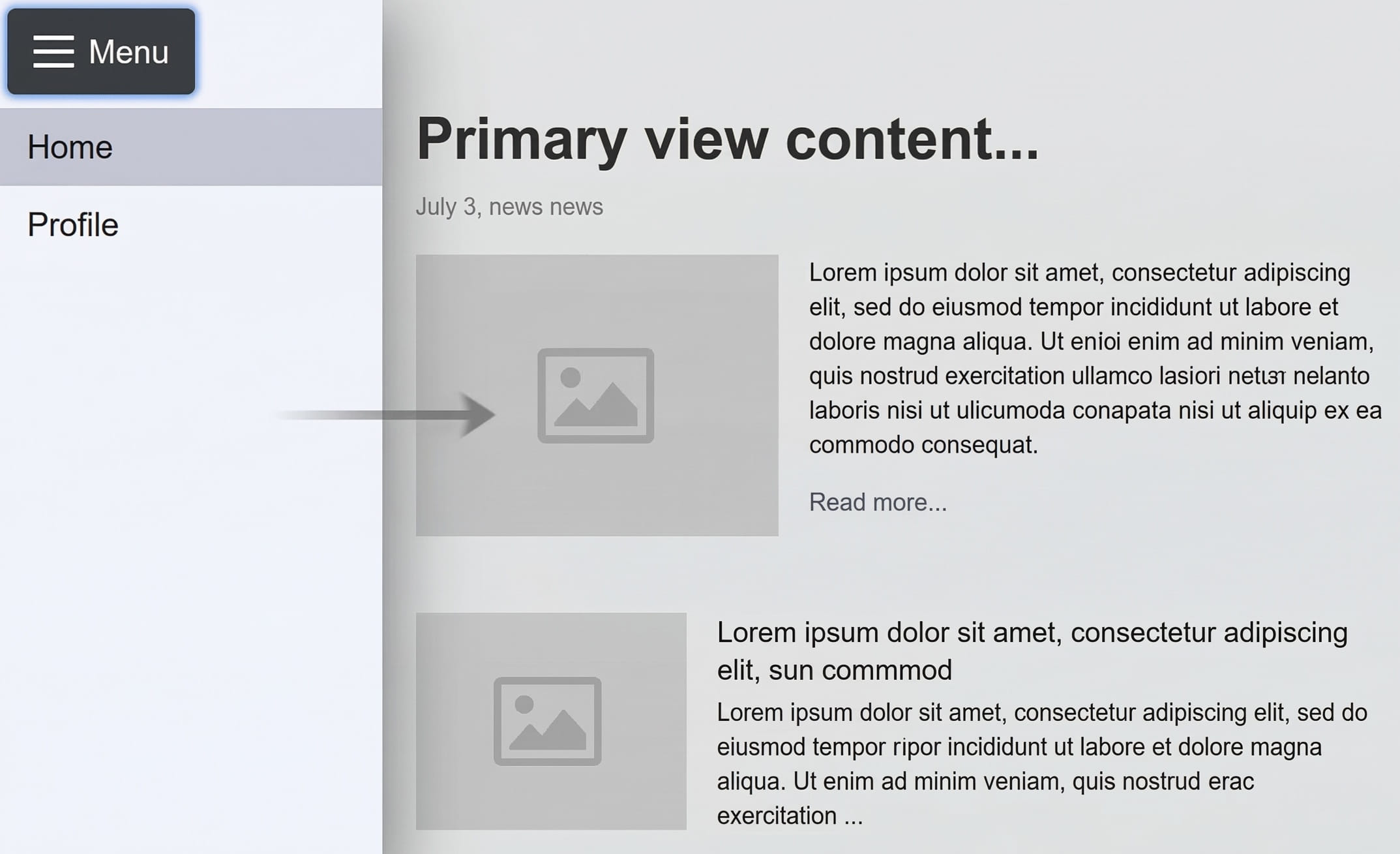
<button commandfor="drawer-menu" command="toggle-overscroll">
  ☰ Menu
</button>
<div id="app-layout" overscrollcontainer="overlay">
  <dialog id="drawer-menu" closedby="any">
    <nav>
      <li><a href="/">Home</a></li>
      <li><a href="/profile">Profile</a></li>
    </nav>
  </dialog>
  <main>Primary view content...</main>
</div>
Implementation Model
Note: This section details the conceptual rendering tree structure.
When configured, the browser constructs an internal box structure to handle hit-testing and painting order:

.containercreates an internal::overscroll-area-parent. This is not affected by scrolling container, and scroll chains to::overscroll-area-parentaftercontainer.::overscroll-area-parentcontains the menu element. As a result, scrolls targeting the menu element chain directly to the::overscroll-area-parent, which can bring the typically-offscreen menu into view.

Modalness, Inertness and Light Dismiss
Note that the side menus, as supported by this feature, are modal to the container in which they reside. Specifically, it means that when the menu is open, the content underneath is not meant to be interacted with.
ISSUE: In the future, we may add other overscroll-container-type values that
support cooperative, non-modal side menus as well. For now, if the behavior
needs to change on, for example, wide screens, it can be accomplished with
media queries and disabling the overscroll feature. This would make the side
menu a regular element in the page.
Being modal implies that, when closed, the menu is not focusable or interactable. For this reason, the overscroll area element that is closed is inert. Conversely, when the overscroll area is open, the regular content that it pushes out of the way or overlays is inerted.
Note that the backdrop acts as a light dismiss signal for this container. It has a default click handler that dismisses the overscroll area.
Note that focus navigation also behaves as if the menu is modal: when traversing the menu, the main content is not visible. This is a consequence of content being inert but worth calling out explicitly.
It is worth mentioning that the invokers for a given overscroll area get special treatment:
toggle-overscroll: this invoker is never inerted by the behavior of the related overscroll area. This allows the developer to, for example, positon it in the overscroll area but peaking into the content area as a toggle button, which will always remain in the interactive set.show-overscroll/hide-overscroll: these invokers are not treated any differently from the regular content or overscroll area and are subject to the same rules as outlined above. This means that if, for example, a show invoker is placed in a closed overscroll area and is peeking, it would be inert. This is considered a developer error: they should use the toggle invoker for this case.
Note that special consideration needs to be taken for multiple overscroll areas
on the same container. This should follow the stacked order: overscroll areas
that are on top of other overscroll areas will inert everything underneath them
including the invokers for the areas underneath them. The above description
of invoker treatment only applies to the overscroll area referenced in the
commandfor attribute of the invoker.
ISSUE: Whether or not the menu automatically dismisses when focus leaves the menu remains an open question.
Accessibility Considerations
We think this proposal solves a major accessibility hurdle in gesture UIs. By
attaching the behavior to a <button>:
- Keyboard Users: Can tab to the button and activate it to reveal the menu/action.
- Screen Readers: Perceive a standard button connection rather than an invisible gesture zone.
- Discoverability: The button provides a visible affordance for the action.
- Mitigation: Because the invoking element and the content both live in HTML,
standard
aria-*attributes can be used for any necessary accessibility mitigations, as needed.
Focus Management
The overscroll area functions similarly to a popover with respect to focus. Activating the overscroll invoker button should not move focus to the menu automatically, but the menu should be next in the focus order.
Furthermore, interactive elements within the overscroll area should not be in the sequential focus navigation order (the tab order). WCAG 3.2.1 Understanding “On Focus” says that focus shouldn’t “change the context”. If there are interactive elements in the overscroll area that remain focusable while the area is closed, then focusing them would need to scroll them into view (required by WCAG 2.4.11 “Focus Not Obscured”), and that would activate the overscroll area. Typically, overscroll areas such as a drawer menu represent a context change, so this would be bad.
Note that the presence or absence of the invoker in the focus order is dictated by its inertness, as discussed above.
Progressive Enhancement
For browsers that do not support this feature, the content simply becomes an inline part of the ordinary scroller. This likely presents as a broken experience.
A polyfill strategy might be to switch the overscroll content to a
popover and switch the command invoker to command=toggle-popover. This would
preserve the semantic relationship and a11y, while providing a functional fallback.
Interaction with Browser Gestures
Many browsers provide built-in overscroll behaviors, such as “pull-to-refresh” (reload) or “swipe-to-navigate” (back/forward).
These behaviors continue to function as-is, since the overscroll area is simply a chained scroller. Once the overscroll area is scrolled fully into view, the scroll will chain to the viewport scroller, and will activate these browser- based overscroll actions.
Alternatives Considered
CSS-only Properties
We considered defining this relationship purely in CSS. While powerful, CSS lacks the semantic enforcement of an interactive element. A CSS-only solution runs the risk of creating “invisible” gestures that are inaccessible to users who cannot perform swipe actions. By requiring an HTML activator, we enforce progressive enhancement.
HTML-only Attributes
We considered having all of the features specified in HTML. Expressing semantic relationships makes sense in HTML, but whether the content is pushed or overlays or displays as a non-overscroll menu seems like a presentational decision that is commonly gated by a media query. For this reason, the configuration of the type of overscroll behavior is controlled from CSS.
Open questions
- ARIA Attributes: Should the browser automatically handle
aria-expandedandaria-controlson the overscroll invoker button based on the visibility of the overscroll content, in the same way that popovers are handled? - Visibility: When not revealed, should the overscroll content be treated
as
aria-hidden="true"? Seems like yes. - Activatable Elements: Are there any interactive elements (like
<area>) that should not be allowed as overscroll invokers? - Pseudo Classes: Should the
:openpseudo class match the overscroll area when it is scrolled into view? Or perhaps a new pseudo class?